 Bulin 47 AI
Bulin 47 AI White Background PNGs for Cleaner Image Layouts
Bulin 47 AI White Background processes pictures in your browser after sign-in. Inputs and results are uploaded to your account for task review. No subscription, credit deduction, or paid cloud model is required. Keep your source and inspect the result before using it elsewhere.
White Background workspace
Drop or paste a JPG, PNG or WebP · up to 30 MB
Up to 8192 pixels per side and 32 megapixels
Free · Sign in to process · Inputs and results are saved to your account. The first cutout downloads a local model. Processing speed depends on your device.
Introduction
What Is Bulin 47 AI White Background?
Bulin 47 AI White Background replaces the area around a photo's subject with solid white and saves that white inside the picture. Choose a bag photographed on a messy desk, then save it against white; the background stays white rather than transparent.
Bulin 47 AI White Background: Create a consistent setting for the subject
A neutral backdrop can make differently photographed items easier to place together in a layout. Bulin 47 AI White Background helps prepare a product illustration, slide asset, or simple visual where the surroundings should be unobtrusive rather than another part of the story.
Use Bulin 47 AI White Background for consistency in the area outside the subject, not as an automatic catalog approval service. A destination may also care about framing, image dimensions, visible labels, or other requirements. Inspect the whole picture instead of treating the fill color as sufficient.
- Prepare a neutral backdrop for an existing subject.
- Review composition and destination requirements separately from the fill.
Bulin 47 AI Put white into the downloaded pixels
A transparent cutout displayed on a white page can look finished until it moves to another surface. Bulin 47 AI White Background includes the white fill in the exported PNG so the surrounding area does not depend on the display color chosen by another application.
The white preset in Bulin 47 AI White Background uses #FFFFFF. Choosing that fill makes the background a deliberate part of the downloaded picture. It differs from exporting alpha, where the area outside the subject remains transparent and reveals whatever design sits behind it.
- Use a filled PNG when the backdrop must remain white.
- Choose alpha instead when another layout should show through.
How to use
How to Use Bulin 47 AI White Background
- Beforebag.jpg
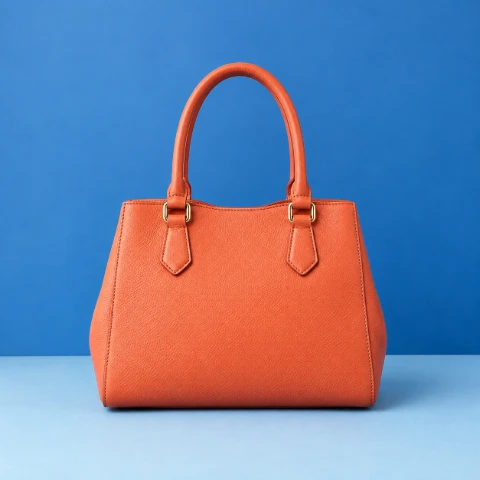 1254 × 1254 px1.63 MBSTEP 1
Bulin 47 AI Choose your source
Open Bulin 47 AI White Background and select a supported local picture. Choose existing cutout mode when the source already has the correct transparency; otherwise use foreground extraction.
- Background#FFFFFFSTEP 2
Bulin 47 AI Prepare the foreground
Let Bulin 47 AI White Background download its model and runtime when required, then process locally. The existing-cutout path skips inference and retains the original alpha channel.
 ↔BeforeAfterSTEP 3
Bulin 47 AI Select white and inspect
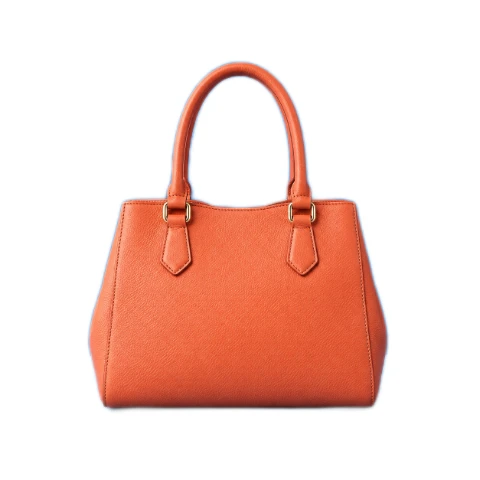
Choose the white fill in Bulin 47 AI White Background, compare the source and result, and zoom into the edges. Try black or custom color temporarily to inspect pale outlines.
- AfterBeforebag.pngDownloadSTEP 4
Bulin 47 AI Download the filled PNG
Return Bulin 47 AI White Background to white before downloading. The PNG includes the chosen solid fill and retains source dimensions, rather than exporting only a white-looking transparent preview.
Features
Bulin 47 AI White Background Features: Real Fill at Source Dimensions
Bulin 47 AI White Background composites the selected backdrop behind the cutout and keeps the source canvas dimensions, making the result predictable without silently reframing the subject.
Bulin 47 AI Keep the image dimensions and subject placement
The PNG exported by Bulin 47 AI White Background retains the source width and height. The tool does not automatically crop closely around the subject or resize it to fit a marketplace slot. Any outer space in the original canvas remains part of the composition.
Use the preview in Bulin 47 AI White Background to decide whether that spacing suits your layout. A smaller item may still occupy only a modest part of the frame after its surroundings change. A separate crop or resize operation is appropriate when the composition itself needs adjustment.
- Retain the original canvas width and height in the PNG.
- Treat reframing and size changes as separate editing decisions.
Bulin 47 AI Switch fills without repeating the model work
Bulin 47 AI White Background can also display transparent, black, and custom HEX backgrounds using the same cutout. Switching among these options does not repeat inference. A dark or contrasting fill can be useful for inspecting an outline before returning to white for the final download.
Choose the white option in Bulin 47 AI White Background before exporting a white-filled PNG. A selected black or custom fill is also embedded when exported, while the transparent choice retains alpha. The final background setting is therefore an output decision, not only a preview preference.
- Test contrasting fills to inspect the same cutout.
- Return to white before saving a white-filled result.

Bulin 47 AI White Background Features: New Separation or Existing Alpha
Bulin 47 AI White Background supports model-based foreground extraction and an existing-cutout mode, allowing you to choose the path that matches the image you already have.
Bulin 47 AI Run U2Netp locally for a new cutout
For a source that needs separation, Bulin 47 AI White Background runs U2Netp through a WASM runtime in your browser. The first run downloads the model and processing resources. Processing runs locally; input and output are saved to your account.
Loading and processing time in Bulin 47 AI White Background depends on the device, source, and browser conditions. Later sessions may reuse available resources, but caching is not permanent. Local operation does not promise instant completion on every device or guaranteed offline access after one visit.
- Allow the initial model and runtime download to complete.
- Keep the page available while local processing is underway.
Bulin 47 AI Skip inference for a prepared transparent source
Existing cutout mode in Bulin 47 AI White Background preserves the original alpha channel and skips model inference. Choose it when a transparent PNG or WebP already contains the outline you need. The remaining task is to composite that prepared subject over a white backdrop.
Bulin 47 AI White Background does not create a new mask in this bypass mode. An opaque photo still needs extraction when its original surroundings should disappear. Existing cutout mode preserves useful transparency; it does not turn an opaque rectangular image into an isolated subject.
- Reuse a prepared alpha channel instead of estimating another one.
- Use extraction when an opaque background still needs separation.
Bulin 47 AI White Background Features: Careful Review and Defined Limits
Bulin 47 AI White Background gives you comparison and zoom controls because a clean-looking backdrop does not guarantee a perfect foreground boundary or a fully finished commercial image.
Bulin 47 AI Inspect the outline and unchanged foreground
Switch between before and after in Bulin 47 AI White Background, then zoom into the outline. Hair, fur, glass, thin structures, and translucent materials can remain imperfect. A pale subject may blend into white, so check the silhouette against black or a contrasting custom color as well.
Bulin 47 AI White Background does not relight the subject, remove reflected color from its surfaces, or generate a convincing studio shadow. A background change can make existing lighting differences more obvious. Evaluate those limitations before using the result in a prominent product display or detailed composition.
- Inspect pale edges against more than one background color.
- Do not expect the fill to change lighting or reflections.
Bulin 47 AI Check the accepted input and file limits
Bulin 47 AI White Background accepts static JPG, PNG, and WebP up to 30 MB per file. The longest side must be no more than 8192 pixels, and the image must contain at most 32 megapixels. Both dimension limits apply to the complete source.
Animation, HEIC, TIFF, SVG, and AVIF are unsupported in Bulin 47 AI White Background. There is no server conversion fallback, no paid cloud API call, and a login requirement but no credit charge. Use a supported source and keep the original for future versions with a different backdrop.
- Check file bytes, longest side, and total pixel count.
- Use supported static sources without expecting automatic format conversion.
User reviews
H3Max video creator feedback.
H3Max creator reviews

I made a full character PV for my game with MiniMax H3 in one afternoon. The menu UI stayed readable in every frame and the character never went off-model. That used to cost me a contractor and three weeks.

We tested every AI video generator on the market for stylized work. H3 is the only one that held our anime style across cuts. We now use it for pitch reels and animatics on every project.

I uploaded four product photos and got a listing video with music and a voiceover the same day. My click-through rate on the new listings is up 38%. H3 even got the label text on my packaging right.

I ship five vertical videos a week for three brands. MiniMax H3 gets me from brief to draft in under an hour, with sound already synced. My old workflow needed a videographer and two review rounds.

The editing side is what sold me. A client wanted the background of an interview changed — I typed one sentence into MiniMax H3 and the lighting on the subject matched the new scene automatically.

I previsualized my entire short film in MiniMax H3 before we shot a single frame. Rack focus, match cuts, even the title cards — it understands director language, not just keywords.
Bulin 47 AI White Background is free after sign-in, with no subscription or credits required. Inputs and results are uploaded and saved to your account for task review.
Bulin 47 AI Pricing and Credit Plans
One-time payment · No subscription
Pay per MV
RECOMMENDED$9.90/ MV
- 10 seconds · 720p · Original soundtrack
- Buy now, create whenever you are ready
- No subscription · No automatic renewal
- Failed generations refund $9.90 per failed MV
1 × $9.90$9.90
Your purchase adds MV uses to your account. It does not start a generation or change your credit balance. Taxes and final total appear at checkout.
Already have credits? Each MV uses 600 credits. Subscriptions and credit packs are still available in the tabs above.
Pay safely and securely with























FAQ
Frequently asked questions
Is Bulin 47 AI White Background free after signing in?
Yes. Bulin 47 AI White Background requires sign-in, but no subscription or credits. The original and finished image are saved to your account and included in task history. Paid plans elsewhere on the site are optional for this tool.
Does Bulin 47 AI White Background upload my photo?
Yes. Bulin 47 AI White Background uploads the original and finished image to your account for task review. Processing runs in your browser; it does not call a paid cloud model. Sign in before processing, and keep the page open until saving finishes.
Does Bulin 47 AI White Background export actual white pixels?
Yes. Selecting white in Bulin 47 AI White Background embeds a #FFFFFF backdrop into the PNG. This differs from a transparent cutout that merely appears white because of the viewing application or page underneath it.
Can Bulin 47 AI White Background use an existing transparent PNG?
Yes. Existing cutout mode in Bulin 47 AI White Background skips inference and preserves the original alpha. Use that path when the source already has a suitable outline and only needs a solid backdrop.
Does Bulin 47 AI White Background resize or tightly crop the result?
No. Bulin 47 AI White Background exports a PNG with the source width and height. The subject stays within that canvas, so use a separate crop or resize workflow when the final layout requires different framing or dimensions.
Can Bulin 47 AI White Background create new studio lighting and shadows?
No. It replaces the surrounding background through cutout compositing. It does not relight the subject, remove colored reflections, or generate a new studio shadow to match the selected backdrop.
Will Bulin 47 AI White Background handle hair and glass perfectly?
That is not guaranteed. Thin strands, low-contrast boundaries, translucent materials, and pale subjects can produce imperfect results. Use zoom and contrasting fills to inspect the outline before relying on the download.
Does Bulin 47 AI White Background automatically meet marketplace image rules?
No. A white backdrop is only one possible requirement. Check the destination for its own dimensions, composition, subject presentation, and file rules rather than assuming the tool guarantees approval or acceptance.
CTA
Build a Cleaner Backdrop with Bulin 47 AI White Background
Prepare the cutout, inspect its outline, and save a PNG with white included in the pixels. Bulin 47 AI White Background keeps the process local and the export straightforward.
Choose an Image