 Bulin 47 AI
Bulin 47 AI Seedance 1.0 Pro for Deliberately Timed Visual Inserts
Build a visual moment to fit a larger edit with Bulin 47 AI Seedance 1.0 Pro on H3 Max. Generate from text or guide the action with opening and ending images. Bulin 47 AI Seedance 1.0 Pro combines integer-second duration choices, fixed-camera control, and a seed input without adding an audio-generation workflow.
Video workspace
The wooden elevator opens
28/45View prompt
Five-second continuous frontal shot of closed wooden elevator doors opening slowly to reveal one adult woman standing inside. Keep the camera fixed at eye level and the woman relaxed, facing forward. Preserve a simple, balanced composition with warm wood grain and soft interior light. End with the doors open and the woman still standing.
Introduction
What Is Bulin 47 AI Seedance 1.0 Pro?
Bulin 47 AI Seedance 1.0 Pro is a ByteDance video generation model with separate text-to-video and image-to-video interfaces documented by fal.
Bulin 47 AI Generate a scene or animate a starting image
Bulin 47 AI Seedance 1.0 Pro constructs video from a written scene or animates a supplied opening picture with an optional last frame. Both routes expose duration, resolution, fixed-camera, and seed parameters. Bulin 47 AI Seedance 1.0 Pro generates a new shot rather than arranging existing footage on a timeline. Describe the visual event you need and the relationships it should preserve.
Bulin 47 AI A picture-focused workflow on H3 Max
Bulin 47 AI Seedance 1.0 Pro offers 480p, 720p, and 1080p output here, with whole-second durations from two through twelve. Use text or image mode, and choose fixed camera and seed settings when useful. This workspace does not offer audio generation for the model. Plan dialogue, music, and sound effects separately, concentrating the generation brief on the appearance, movement, and timing of the picture.
How to use
How to Create with Bulin 47 AI Seedance 1.0 Pro
- PromptSTEP 1
Bulin 47 AI Start with text or a frame
Select Bulin 47 AI Seedance 1.0 Pro and choose text or image mode. Write the scene, or supply the opening image. Add an ending image only when the destination is already defined.
- ModelSeedance 1.0 Pro1080p16:95sPromptSTEP 2
Bulin 47 AI Describe the visible event
Tell Bulin 47 AI Seedance 1.0 Pro what should move and what should remain recognizable. Keep the action appropriate to a short insert, and leave soundtrack production outside this workflow.
- First frameLast frame
 0.0s
0.0s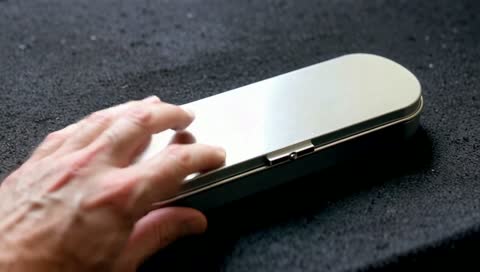 2.5s
2.5s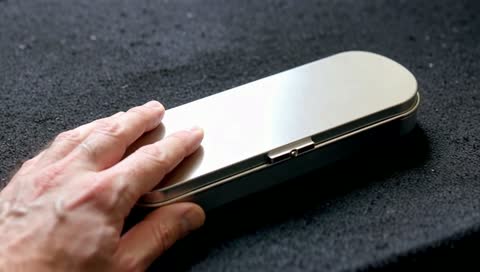 4.5sSTEP 3
Bulin 47 AI Configure timing and viewpoint
Set a whole-second duration from two to twelve, choose an available resolution, and configure fixed camera and seed. Review the Bulin 47 AI Seedance 1.0 Pro workspace credits before generating.
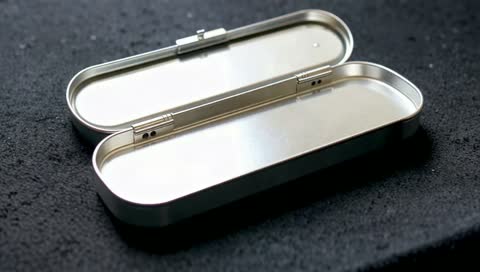
- Create a four-second close view of an unmarked brushed aluminum pencil tin on a charcoal felt mat. An adult hand slides the lid closed in one measured movement, then holds still. Fixed camera at a slightly elevated angle. Keep the tin proportions, lid mechanism, and mat consistent. Soft side light, no additional objects, text, cuts, or changes of setting.DownloadSTEP 4
Bulin 47 AI Check the complete movement
Watch the Bulin 47 AI Seedance 1.0 Pro clip at normal speed and inspect its object relationships. Keep the useful candidate, or revise a single issue while preserving the other settings.
Features
Fit the Available Time with Bulin 47 AI Seedance 1.0 Pro
Whole-second duration choices let Bulin 47 AI Seedance 1.0 Pro serve a specific gap in an edit rather than forcing every idea into the same length.
Give the Bulin 47 AI Seedance 1.0 Pro insert one visible purpose
For a two- or three-second insert, focus on a single event such as a pencil tin lid sliding closed. Avoid adding a camera reveal, a hand entering, and a second action to that tiny window. Ask Bulin 47 AI Seedance 1.0 Pro for the state change that matters. Review Bulin 47 AI Seedance 1.0 Pro at normal speed to make sure the viewer can understand the movement without pausing the clip.
Bulin 47 AI Choose time for anticipation and completion
A longer duration can show the approach to the event and the settled result afterward. Seven seconds, for example, can give a hand time to reach the tin, move the lid, and withdraw. Tell Bulin 47 AI Seedance 1.0 Pro which part deserves emphasis. Do not assume that selecting a longer clip creates a more complete story; a specific sequence of connected actions still belongs in the brief.
Describe a Readable Scene for Bulin 47 AI Seedance 1.0 Pro
Text mode gives Bulin 47 AI Seedance 1.0 Pro the subject, setting, and visual relationships needed to construct a new insert shot.
Bulin 47 AI Stage the action before choosing its mood
Describe the tin on a felt mat, its sliding lid half open, and the position of the hand that will move it. Keep the background simple enough that the viewer immediately sees the action. Bulin 47 AI Seedance 1.0 Pro can then be directed with practical details such as side lighting and a slightly elevated viewpoint. Avoid a long list of styles that compete with the intended subject.
Bulin 47 AI Define what does not change
Stability matters when the scene contains a recognizable object. Ask Bulin 47 AI Seedance 1.0 Pro to keep the tin dimensions, surface finish, and supporting mat consistent while the lid moves. Those instructions define a review target, not a guarantee of exact preservation. Check Bulin 47 AI Seedance 1.0 Pro output for changes in hinges, edges, or contact with the table that could make the action difficult to understand or use.
Bridge Two Visual States with Bulin 47 AI Seedance 1.0 Pro
The image route lets Bulin 47 AI Seedance 1.0 Pro begin from an opening frame and work toward an optional ending frame.
Bulin 47 AI Use endpoints that explain the same object
For a closing-lid action, the first frame can show the tin open and the last can show it shut from a compatible viewpoint. Bulin 47 AI Seedance 1.0 Pro receives a clearer task when both pictures agree about the object, lighting, and surface. Describe how the action travels between them. Ask Bulin 47 AI Seedance 1.0 Pro to avoid introducing another hand, changing the lid mechanism, or replacing the surrounding set.
Inspect the Bulin 47 AI Seedance 1.0 Pro path between endpoints
Matching start and finish pictures does not establish what happens in every intermediate frame. Watch for the lid passing through the object, a hand losing contact, or materials changing mid-motion. Bulin 47 AI Seedance 1.0 Pro should be judged on the connecting action, not just two familiar compositions. Use one opening image without a last frame when the ending is flexible and the subject only needs a modest movement.
Keep a Deliberate Viewpoint with Bulin 47 AI Seedance 1.0 Pro
Choose fixed camera in Bulin 47 AI Seedance 1.0 Pro when movement inside the scene should carry the shot instead of a travelling viewpoint.
Establish a stable Bulin 47 AI Seedance 1.0 Pro viewpoint
A fixed view makes it easier to compare where an object begins and ends. Stage the tin, mat, and hand so the action is visible without a camera move. Bulin 47 AI Seedance 1.0 Pro fixed-camera control requests camera stability; it does not immobilize the subject. Describe the action that should occur within the composition, and avoid simultaneously instructing the viewpoint to orbit or pull backward.
Bulin 47 AI Plan camera motion as a different decision
When viewpoint movement is essential, leave fixed camera off and distinguish camera motion from subject motion. With Bulin 47 AI Seedance 1.0 Pro, decide whether the shot is about the sliding lid or the changing perspective. Compare the resulting Bulin 47 AI Seedance 1.0 Pro clip against that intention, looking for unwanted drift or a move that hides the main action.
Prepare a Usable Bulin 47 AI Seedance 1.0 Pro Candidate
Bulin 47 AI Seedance 1.0 Pro output and seed settings support organized comparisons before a clip becomes part of a larger production.
Bulin 47 AI Keep track of a controlled revision
Record the seed and retain the same prompt, images, and settings when examining a particular variation. Bulin 47 AI Seedance 1.0 Pro exposes a seed input, but this is not an exact-reproduction promise. A fresh result still needs review. Ask Bulin 47 AI Seedance 1.0 Pro for one focused change, such as a slower lid movement, rather than adjusting the subject, duration, viewpoint, and lighting together without a clear reason.
Bulin 47 AI Inspect the picture before adding sound elsewhere
Choose 480p, 720p, or 1080p and inspect the movement and important object details. Arrange any soundtrack separately; this model has no audio option here. Before another Bulin 47 AI Seedance 1.0 Pro request, review the workspace credits. Keep the candidate that fits the intended cut and preserves a readable action, rather than selecting solely by an attractive still frame.
Example prompts
Bulin 47 AI Text: a compact closing action
Create a four-second close view of an unmarked brushed aluminum pencil tin on a charcoal felt mat. An adult hand slides the lid closed in one measured movement, then holds still. Fixed camera at a slightly elevated angle. Keep the tin proportions, lid mechanism, and mat consistent. Soft side light, no additional objects, text, cuts, or changes of setting.
Bulin 47 AI Image: open tin to closed tin
Use the supplied first frame of the open tin and last frame of the closed tin. Over seven seconds, let the visible adult hand slide the lid into its final position and withdraw. Keep the camera fixed. Preserve the metal finish, object dimensions, and mat position. Maintain clear contact between hand and lid. End with the closed tin resting on the mat.
Bulin 47 AI Text: a quiet visual insert
Create a three-second visual insert of a narrow ribbon falling gently across the corner of an unmarked closed notebook. The notebook rests on pale linen and remains still. Locked viewpoint, close framing, warm side light. Show one natural ribbon movement and a brief settled finish. No hands entering, new objects, printed words, or camera movement.
User reviews
H3Max video creator feedback.
H3Max creator reviews

I made a full character PV for my game with MiniMax H3 in one afternoon. The menu UI stayed readable in every frame and the character never went off-model. That used to cost me a contractor and three weeks.

We tested every AI video generator on the market for stylized work. H3 is the only one that held our anime style across cuts. We now use it for pitch reels and animatics on every project.

I uploaded four product photos and got a listing video with music and a voiceover the same day. My click-through rate on the new listings is up 38%. H3 even got the label text on my packaging right.

I ship five vertical videos a week for three brands. MiniMax H3 gets me from brief to draft in under an hour, with sound already synced. My old workflow needed a videographer and two review rounds.

The editing side is what sold me. A client wanted the background of an interview changed — I typed one sentence into MiniMax H3 and the lighting on the subject matched the new scene automatically.

I previsualized my entire short film in MiniMax H3 before we shot a single frame. Rack focus, match cuts, even the title cards — it understands director language, not just keywords.
Bulin 47 AI Pricing and Credit Plans
One-time payment · No subscription
Pay per MV
RECOMMENDED$9.90/ MV
- 10 seconds · 720p · Original soundtrack
- Buy now, create whenever you are ready
- No subscription · No automatic renewal
- Failed generations refund $9.90 per failed MV
1 × $9.90$9.90
Your purchase adds MV uses to your account. It does not start a generation or change your credit balance. Taxes and final total appear at checkout.
Already have credits? Each MV uses 600 credits. Subscriptions and credit packs are still available in the tabs above.
Pay safely and securely with























FAQ
Frequently asked questions
What can Bulin 47 AI Seedance 1.0 Pro generate from?
Use a text description to create a new scene, or provide an opening image in image mode. You can also add an optional last frame. This workflow does not accept a multimodal reference collection of videos and audio.
Which duration values are available?
Bulin 47 AI Seedance 1.0 Pro supports each whole-second choice from two through twelve seconds on H3 Max. Choose a duration that leaves enough time for the action and its result. Do not assume a longer setting improves an unclear brief.
Does Bulin 47 AI Seedance 1.0 Pro generate a soundtrack?
No audio-generation option is provided for this model in the workspace. Develop the picture here and arrange any dialogue, music, or effects separately. The prompt should focus on visible action rather than expecting a requested sound to be produced.
Can I guide the last frame?
Bulin 47 AI Seedance 1.0 Pro image mode accepts an optional ending image alongside the opening image. Use compatible frames to describe the intended change of state. Review the intervening motion for object changes or an implausible transition.
What does Bulin 47 AI Seedance 1.0 Pro fixed camera mean?
It requests a fixed camera position, not a frozen subject. The action can still happen inside the frame. Keep your written camera directions consistent with the selected control, and check the result for unintended viewpoint movement.
Which resolutions are offered?
Bulin 47 AI Seedance 1.0 Pro provides 480p, 720p, and 1080p output here. Select the size for the intended use and inspect the finished clip. Resolution alone does not establish accurate object geometry or a successful action.
How should I use the seed and credit quote?
Keep the Bulin 47 AI Seedance 1.0 Pro seed with the prompt and settings to organize comparisons. Do not expect guaranteed identical repeats. Review the workspace credits before every request, especially when duration or output resolution changes.
CTA
Make the Next Visual Insert with Bulin 47 AI Seedance 1.0 Pro
Define the action, choose its duration, and review the workspace credits. Bring Bulin 47 AI Seedance 1.0 Pro a clear picture brief on H3 Max and judge the result by the cut it needs to serve.
Build a Visual Clip