 Bulin 47 AI
Bulin 47 AI Wan 2.6 for Focused Scene Briefs and Single-Image Motion
A useful video brief tells the viewer where to look and what changes. Use Bulin 47 AI Wan 2.6 on H3 Max to develop text-led scenes or animate one starting image, with enough time for an action to become clear without turning a short clip into an overloaded story.
Video workspace
The wooden elevator opens
28/45View prompt
Five-second continuous frontal shot of closed wooden elevator doors opening slowly to reveal one adult woman standing inside. Keep the camera fixed at eye level and the woman relaxed, facing forward. Preserve a simple, balanced composition with warm wood grain and soft interior light. End with the doors open and the woman still standing.
Introduction
What Is Bulin 47 AI Wan 2.6?
Bulin 47 AI Wan 2.6 belongs to Alibaba’s video generation family. Its fal text and image endpoints turn a written scene or supplied opening picture into a moving result.
Bulin 47 AI A scene model with two practical starting points
The text route lets Bulin 47 AI Wan 2.6 establish the picture from your description; the image route starts with one supplied frame. Both accept motion instructions and offer 720p or 1080p output. The choice is about what you already know: use words when exploring a scene, or use an image when its subject and arrangement are already important.
The Bulin 47 AI Wan 2.6 workflow on H3 Max
This workspace offers text and single-image generation with 5, 10, or 15 seconds to work with. Keep the prompt within 1500 characters. Bulin 47 AI Wan 2.6 here does not provide a reference-video mode or a custom audio upload. Build the request around the available starting material and the visible action you want to evaluate.
How to use
How to Build a Bulin 47 AI Wan 2.6 Scene
- PromptSTEP 1
Bulin 47 AI Choose text or an image
Open Bulin 47 AI Wan 2.6 on H3 Max. Use text for a newly described scene or image mode with one prepared picture when the starting appearance should guide the result.
- ModelWan 2.6720p16:95sPromptSTEP 2
Bulin 47 AI Write a compact motion brief
Give Bulin 47 AI Wan 2.6 a clear subject, observable movement, and finishing state. Keep the prompt within 1500 characters and remove repeated or contradictory instructions before submitting.
- First frameLast frame
 0.0s
0.0s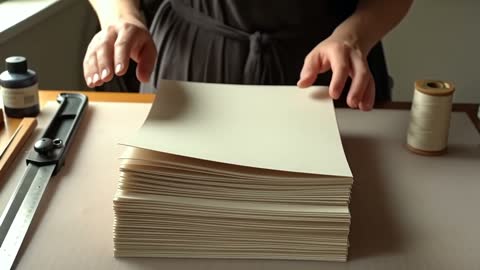 2.5s
2.5s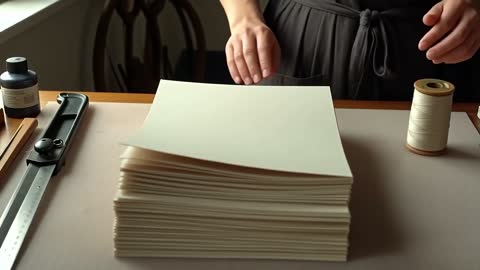 4.5sSTEP 3
Bulin 47 AI Select the output conditions
Set Bulin 47 AI Wan 2.6 to 720p or 1080p and choose 5, 10, or 15 seconds. Review the displayed credits after selecting the configuration for your scene.
- Create a five-second scene in a quiet bookbinding workshop. A craftsperson places one folded sheet neatly on a stack and lifts their hands away. Medium close framing, steady viewpoint, soft side light, visible wooden table edge. Keep the stack aligned and the surrounding tools still. End on the completed placement. No scene change or added lettering.DownloadSTEP 4
Bulin 47 AI Watch and refine
Review the complete Bulin 47 AI Wan 2.6 clip, paying attention to contact, scale, and the ending. Keep the useful composition and revise one problem in the next brief.
Features
Make Every Line of the Bulin 47 AI Wan 2.6 Brief Useful
The prompt limit encourages a clear hierarchy. Give Bulin 47 AI Wan 2.6 the scene, the important action, and the composition before spending space on secondary decoration.
Bulin 47 AI Write the event before the atmosphere
Start with something a camera could observe: a paper lantern rising beside a window, or a shopkeeper arranging three folded scarves. Then explain the setting and lighting. A Bulin 47 AI Wan 2.6 brief becomes easier to judge when it contains a concrete event rather than several interchangeable adjectives. Keep one sentence for the movement and another for what must remain stable.
Bulin 47 AI Remove instructions that pull in opposite directions
A request cannot be both a tight detail shot and a continuous view of an entire room without explaining a change of framing. Read the Bulin 47 AI Wan 2.6 prompt for contradictions before submitting. Remove repeated style words and prioritize the details essential to the assignment. Save a concise version of the brief so later revisions do not accumulate conflicting instructions.
Shape the Bulin 47 AI Wan 2.6 Moment Around Its Duration
The available time changes how much the audience can read. Choose the Bulin 47 AI Wan 2.6 duration according to the action’s beginning, development, and stopping point.
Bulin 47 AI Use five seconds for a compact visual event
For a short clip, let the scene begin near the action. A hand can set down a stamp, or a curtain can lift enough to reveal a window. Ask Bulin 47 AI Wan 2.6 for one event with a clear result. Avoid using most of the time to establish unrelated surroundings when the important movement needs to happen before the clip ends.
Bulin 47 AI Let ten or fifteen seconds develop one idea
A longer take can show preparation, movement, and a pause without changing location. Describe those stages as connected actions rather than a list of separate scenes. With Bulin 47 AI Wan 2.6, give the middle of the shot a purpose, such as showing a ribbon passing through a buckle. Check that the ending arrives naturally instead of simply stopping mid-action.
Give One Image a Useful Bulin 47 AI Wan 2.6 Movement
A starting picture already contains choices about appearance and framing. Use Bulin 47 AI Wan 2.6 to explore motion around those choices instead of asking the prompt to replace them all.
Bulin 47 AI Pick the image for the planned action
Choose a source in which the moving subject is visible and has room to move. An image cropped through a sleeve or handle may be unsuitable for a turning action. Before using Bulin 47 AI Wan 2.6, inspect the silhouette, surface contact, and background. A clear initial relationship between objects gives you a stronger basis for judging whether the generated motion makes sense.
Bulin 47 AI Describe the finish in words
This image workflow uses one opening picture, not an uploaded ending frame. Tell Bulin 47 AI Wan 2.6 how the action should resolve: the person looks back toward the table, the fabric settles, or the camera stops beside the display. Keep that destination compatible with the source. Review whether the movement preserves recognizable shapes instead of relying only on a pleasing first frame.
Guide Bulin 47 AI Wan 2.6 Through a Readable Scene
A shot needs more than movement; it needs a reason to hold attention. Direct Bulin 47 AI Wan 2.6 toward a visible relationship between the subject, setting, and camera.
Bulin 47 AI Use a stable feature to explain the motion
A fixed doorway or table edge helps establish how the subject moves through space. Describe that anchor when writing the scene. In a Bulin 47 AI Wan 2.6 result, compare the moving object with its surroundings rather than judging it in isolation. Sliding feet, changing scale, or a wandering contact shadow can reveal a problem that is less obvious in a paused close-up.
Bulin 47 AI Give the background a supporting role
Choose one environmental detail that belongs to the scene, such as a slight curtain movement or light shifting across a wall. Keep it quieter than the main event. A Bulin 47 AI Wan 2.6 brief does not need activity in every part of the frame. Leaving some areas stable helps the audience follow the intended action and makes unwanted changes easier to notice.
Evaluate the Bulin 47 AI Wan 2.6 Clip at Its Delivery Size
The workspace offers two output sizes, but both still need editorial judgment. Review Bulin 47 AI Wan 2.6 as a complete moving scene before choosing a version for further use.
Bulin 47 AI Choose 720p or 1080p with a destination in mind
Select the available resolution and check the displayed credits before generating. When examining Bulin 47 AI Wan 2.6 output, look at small features at a realistic viewing size as well as close up. A larger frame does not guarantee correct lettering, realistic surfaces, or a stable face. Decide whether the composition communicates clearly before trying to solve every issue through output size.
Bulin 47 AI Turn feedback into one specific revision
Replace a vague request for improvement with a visible correction: reduce the turn, shorten the approach, or preserve the location of an object. Keep the other Bulin 47 AI Wan 2.6 instructions unchanged where they already work. Compare the next clip against that single objective. This makes revision a deliberate creative decision rather than a search through unrelated versions of the scene.
Example prompts
Bulin 47 AI Text: one purposeful workshop action
Create a five-second scene in a quiet bookbinding workshop. A craftsperson places one folded sheet neatly on a stack and lifts their hands away. Medium close framing, steady viewpoint, soft side light, visible wooden table edge. Keep the stack aligned and the surrounding tools still. End on the completed placement. No scene change or added lettering.
Bulin 47 AI Image: a gradual fabric movement
Animate the supplied photograph for ten seconds. Let the visible scarf lift slightly in a gentle breeze and then settle back against the same display. Preserve its pattern, proportions, supporting stand, and background. Keep the camera steady and the movement concentrated in the fabric. Finish with the scarf resting naturally. Do not add another item.
Bulin 47 AI Text: a longer reveal of the setting
Create a fifteen-second continuous shot of an empty reading nook. Begin near the corner of a wooden desk, then move slowly sideways to reveal the chair and tall window. Keep the furniture still and the lighting consistent. A curtain moves only slightly. Let the camera settle for the final two seconds. No cuts, people, or text overlays.
User reviews
H3Max video creator feedback.
H3Max creator reviews

I made a full character PV for my game with MiniMax H3 in one afternoon. The menu UI stayed readable in every frame and the character never went off-model. That used to cost me a contractor and three weeks.

We tested every AI video generator on the market for stylized work. H3 is the only one that held our anime style across cuts. We now use it for pitch reels and animatics on every project.

I uploaded four product photos and got a listing video with music and a voiceover the same day. My click-through rate on the new listings is up 38%. H3 even got the label text on my packaging right.

I ship five vertical videos a week for three brands. MiniMax H3 gets me from brief to draft in under an hour, with sound already synced. My old workflow needed a videographer and two review rounds.

The editing side is what sold me. A client wanted the background of an interview changed — I typed one sentence into MiniMax H3 and the lighting on the subject matched the new scene automatically.

I previsualized my entire short film in MiniMax H3 before we shot a single frame. Rack focus, match cuts, even the title cards — it understands director language, not just keywords.
Bulin 47 AI Pricing and Credit Plans
One-time payment · No subscription
Pay per MV
RECOMMENDED$9.90/ MV
- 10 seconds · 720p · Original soundtrack
- Buy now, create whenever you are ready
- No subscription · No automatic renewal
- Failed generations refund $9.90 per failed MV
1 × $9.90$9.90
Your purchase adds MV uses to your account. It does not start a generation or change your credit balance. Taxes and final total appear at checkout.
Already have credits? Each MV uses 600 credits. Subscriptions and credit packs are still available in the tabs above.
Pay safely and securely with























FAQ
Frequently asked questions
What input modes does Bulin 47 AI Wan 2.6 provide here?
The Bulin 47 AI Wan 2.6 workspace on H3 Max offers text-to-video and image-to-video. Image mode uses a single opening picture. It is not a reference collection workflow for combining uploaded videos, images, and audio.
What is the Bulin 47 AI Wan 2.6 prompt limit?
Keep the Bulin 47 AI Wan 2.6 prompt within 1500 characters, not 1500 words. Describe the subject, action, and important framing first. Remove duplicate instructions so the request remains readable and specific.
Which durations can I choose for Bulin 47 AI Wan 2.6?
Bulin 47 AI Wan 2.6 offers 5, 10, or 15 seconds in this workspace. Choose five seconds for a compact event, or use a longer option when the action needs preparation and a settled ending.
Does Bulin 47 AI Wan 2.6 support 480p output here?
No. The available Bulin 47 AI Wan 2.6 output sizes are 720p and 1080p. Check the selected resolution and workspace credits before generating rather than assuming the same options apply across all video models.
Can Bulin 47 AI Wan 2.6 use an uploaded last frame?
Not in this workflow. Bulin 47 AI Wan 2.6 image mode takes one starting picture. Describe the desired finishing state in the prompt and review the result; there is no second image slot for the destination.
Can I supply music or a reference video to Bulin 47 AI Wan 2.6?
The Bulin 47 AI Wan 2.6 workflow described here does not expose custom audio input or reference-video generation. Use text or one image as the starting point rather than preparing extra media for unavailable controls.
How should I review a Bulin 47 AI Wan 2.6 product scene?
Compare the Bulin 47 AI Wan 2.6 clip with the source throughout the action. Inspect shapes, labels, color, and contact with supporting surfaces. Reject changes that could misrepresent the real item, even when the overall motion looks attractive.
CTA
Give Bulin 47 AI Wan 2.6 a Scene with a Clear Purpose
Choose the starting point, write the essential action, and review the settings and credits. Develop a Bulin 47 AI Wan 2.6 clip on H3 Max around a visual moment you can meaningfully assess.
Start Your Scene