 Bulin 47 AI
Bulin 47 AI MiniMax H3 Max Turbo for Focused Video Ideas
Turn a concise motion brief into a short audiovisual scene. Bulin 47 AI MiniMax H3 Max Turbo on H3 Max supports text and image starts, with native sound accompanying the picture. Use Bulin 47 AI MiniMax H3 Max Turbo to explore one movement, a clear opening, and a purposeful ending rather than crowding an entire story into a single clip.
Video workspace
The wooden elevator opens
28/45View prompt
Five-second continuous frontal shot of closed wooden elevator doors opening slowly to reveal one adult woman standing inside. Keep the camera fixed at eye level and the woman relaxed, facing forward. Preserve a simple, balanced composition with warm wood grain and soft interior light. End with the doors open and the woman still standing.
Introduction
What Is Bulin 47 AI MiniMax H3 Max Turbo?
Bulin 47 AI MiniMax H3 Max Turbo is fal's post-trained video variant built from MiniMax H3, with text-to-video and image-to-video interfaces.
Bulin 47 AI A distinct variant, not a renamed mode
fal describes Bulin 47 AI MiniMax H3 Max Turbo as tuned for prompt adherence, visual aesthetics, and higher throughput through its inference stack. That positioning explains the variant without promising a particular completion time for your request. Bulin 47 AI MiniMax H3 Max Turbo generates short audiovisual clips; it should not be treated as every specialist tool in the wider family bundled into one selection.
Bulin 47 AI Start with words or a visible frame
On H3 Max, Bulin 47 AI MiniMax H3 Max Turbo supports text and image workflows for clips lasting five to fifteen seconds. Write a scene from scratch or supply an opening image and describe its movement. Bulin 47 AI MiniMax H3 Max Turbo can also use an optional ending frame in image mode. Choose the starting material according to what your brief already establishes and what the model still needs to invent.
How to use
How to Create with Bulin 47 AI MiniMax H3 Max Turbo
- PromptSTEP 1
Bulin 47 AI Choose your starting mode
Select Bulin 47 AI MiniMax H3 Max Turbo in H3 Max. Start from text or upload an opening image in image mode, adding a compatible ending frame when needed.
- ModelMiniMax H3 Max Turbo480P16:95sPromptSTEP 2
Bulin 47 AI Describe movement and sound together
Give Bulin 47 AI MiniMax H3 Max Turbo a main action, a camera instruction, and a concise soundscape. Name the visual details you want kept recognizable throughout the clip.
- First frameLast frame
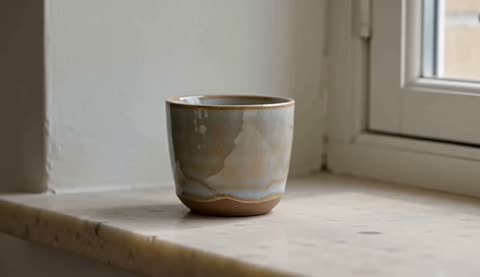 0.0s
0.0s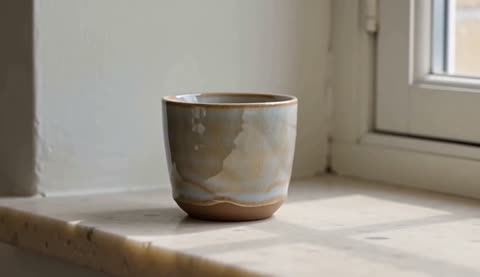 2.6s
2.6s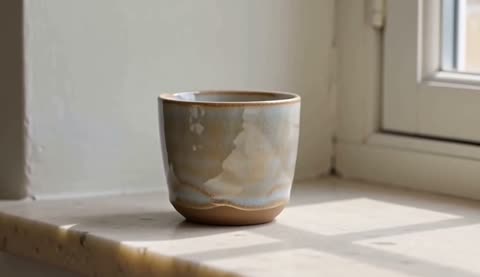 4.7sSTEP 3
Bulin 47 AI Review duration, size, and credits
Choose five to fifteen seconds and 480P, 768P, or refined 1080P output. Check the supplied frames and the credits shown for the request before you submit.
- Create one five-second shot of an unbranded handmade ceramic cup on a pale stone shelf. Begin still, then make a very slow camera push toward the cup while soft window light reveals its uneven glaze. Keep the cup stationary and the background simple. Quiet room ambience with a faint outdoor breeze. No speech, music, hands, lettering, scene cuts, or new props.DownloadSTEP 4
Bulin 47 AI Watch, listen, and refine
Review the entire Bulin 47 AI MiniMax H3 Max Turbo clip. Compare it with the brief, identify one issue, and make the next request address that issue directly.
Features
Give Bulin 47 AI MiniMax H3 Max Turbo One Clear Action
Bulin 47 AI MiniMax H3 Max Turbo can begin from a written scene, with the subject, camera, and action described together in the prompt.
Bulin 47 AI Separate subject movement from camera movement
A subject turning toward a window is different from the camera circling a stationary subject. Tell Bulin 47 AI MiniMax H3 Max Turbo which movement you want and how much of it should happen. Give Bulin 47 AI MiniMax H3 Max Turbo a stable starting arrangement before describing change. A simple movement with a clear destination is easier to judge than several simultaneous actions competing for the viewer's attention.
Bulin 47 AI Write a beginning and a stopping point
Describe what the viewer sees first, what changes, and where the movement should settle. For Bulin 47 AI MiniMax H3 Max Turbo, an opening pause followed by a gentle turn can be a complete idea. Leave time to register the result. Avoid asking a short clip to introduce several locations, demonstrate a product, deliver dialogue, and end with a complicated reveal all at once.
Animate a Starting Image with Bulin 47 AI MiniMax H3 Max Turbo
Bulin 47 AI MiniMax H3 Max Turbo image mode uses a supplied frame as the visual starting point rather than treating it as general inspiration.
Bulin 47 AI Choose a frame that supports the movement
Use an image whose subject is visible and has room to move. Bulin 47 AI MiniMax H3 Max Turbo follows the supplied image for its output canvas, so consider the framing before uploading. Ask Bulin 47 AI MiniMax H3 Max Turbo for motion compatible with that view. A small turn or gradual camera approach may suit a tight composition better than a large orbit that requires inventing unseen surfaces.
Bulin 47 AI Use an ending frame with a clear purpose
An optional last frame gives the clip another visual target. For Bulin 47 AI MiniMax H3 Max Turbo, choose endpoints that can plausibly connect within the selected duration and explain the transition in the prompt. Similar lighting, subject scale, and composition can make the intended change easier to understand. Inspect the movement between the frames; a recognizable beginning and ending do not guarantee a convincing path between them.
Describe Picture and Sound for Bulin 47 AI MiniMax H3 Max Turbo
Bulin 47 AI MiniMax H3 Max Turbo produces native audio with its video, allowing the scene brief to include atmosphere and audible action.
Bulin 47 AI Tie sound to something visible
A cup touching a saucer, a curtain moving near an open window, or footsteps crossing a quiet room each suggests an audible event. Tell Bulin 47 AI MiniMax H3 Max Turbo which sound belongs to the action. Give Bulin 47 AI MiniMax H3 Max Turbo a restrained soundscape when the image is restrained. Extra music or dialogue should support the scene rather than obscure the movement you are trying to evaluate.
Bulin 47 AI Keep spoken material short and review it
When the idea includes speech, specify a short line and the intended delivery in your prompt. Review Bulin 47 AI MiniMax H3 Max Turbo with the sound playing, checking the words, timing, and visible performance together. Native audio is not a guarantee of exact speech or flawless mouth movement. A scene without dialogue can be the clearer choice when the visual action already communicates the intended idea.
Set a Useful Clip Length for Bulin 47 AI MiniMax H3 Max Turbo
Plan Bulin 47 AI MiniMax H3 Max Turbo around the movement you need, using the workspace settings rather than a duration written only in the prompt.
Bulin 47 AI Allow enough time for the action
The supported clip range is five to fifteen seconds. Choose a shorter Bulin 47 AI MiniMax H3 Max Turbo request for a simple action and allow more room when the viewer needs to notice a change. Bulin 47 AI MiniMax H3 Max Turbo still benefits from a concise brief at the longer setting. More seconds should create useful pacing, not an excuse to add unrelated scenes or unnecessary camera movement.
Bulin 47 AI Match framing and output settings
Choose 480P, 768P, or 1080P in the workspace. The 1080P option uses latent refinement from a native 768P source rather than native 1080P generation. In text mode, Bulin 47 AI MiniMax H3 Max Turbo offers several frame shapes; image mode follows the supplied frame. Leave essential action inside that view and inspect the result in its intended placement. A larger output does not guarantee every small detail remains accurate.
Compare Motion Decisions with Bulin 47 AI MiniMax H3 Max Turbo
Bulin 47 AI MiniMax H3 Max Turbo can support an iterative creative process when every new request tests a specific change to the same brief.
Bulin 47 AI Change one production decision at a time
Keep the subject and setting steady while adjusting camera speed, the scale of a gesture, or the intensity of the soundscape. A Bulin 47 AI MiniMax H3 Max Turbo comparison becomes useful when its purpose is explicit. Before another Bulin 47 AI MiniMax H3 Max Turbo request, identify the issue you observed and the instruction intended to address it. Avoid replacing the entire brief when only one movement needs attention.
Bulin 47 AI Review the whole clip, not a favorite frame
Watch Bulin 47 AI MiniMax H3 Max Turbo output at normal speed and pause at difficult moments. Look for changing proportions, unstable small details, or objects that lose contact with their surroundings. Listen for abrupt or distracting sound. Keep the result only when the moving scene serves the brief, and check the displayed credits again before beginning a revision with different settings.
Example prompts
Bulin 47 AI A quiet ceramic reveal from text
Create one five-second shot of an unbranded handmade ceramic cup on a pale stone shelf. Begin still, then make a very slow camera push toward the cup while soft window light reveals its uneven glaze. Keep the cup stationary and the background simple. Quiet room ambience with a faint outdoor breeze. No speech, music, hands, lettering, scene cuts, or new props.
Bulin 47 AI A subtle movement from an opening image
Use the uploaded opening image as the starting composition. Over five seconds, let the visible adult subject make a small natural turn toward the window and settle. Aim to preserve their recognizable appearance, clothing, lighting, and surroundings. Keep the camera almost still and the movement restrained. Soft room ambience, no spoken dialogue, no new people, and no cut to another scene.
Bulin 47 AI Connect two supplied compositions
Use the uploaded first and last frames as the visual endpoints of a ten-second shot. Move gently from the opening view toward the ending composition, keeping the main object grounded and recognizable. Maintain consistent light and background. Allow a brief pause at both ends. Subtle ambient sound, no dialogue, added text, extra objects, or abrupt transformation.
User reviews
H3Max video creator feedback.
H3Max creator reviews

I made a full character PV for my game with MiniMax H3 in one afternoon. The menu UI stayed readable in every frame and the character never went off-model. That used to cost me a contractor and three weeks.

We tested every AI video generator on the market for stylized work. H3 is the only one that held our anime style across cuts. We now use it for pitch reels and animatics on every project.

I uploaded four product photos and got a listing video with music and a voiceover the same day. My click-through rate on the new listings is up 38%. H3 even got the label text on my packaging right.

I ship five vertical videos a week for three brands. MiniMax H3 gets me from brief to draft in under an hour, with sound already synced. My old workflow needed a videographer and two review rounds.

The editing side is what sold me. A client wanted the background of an interview changed — I typed one sentence into MiniMax H3 and the lighting on the subject matched the new scene automatically.

I previsualized my entire short film in MiniMax H3 before we shot a single frame. Rack focus, match cuts, even the title cards — it understands director language, not just keywords.
Bulin 47 AI Pricing and Credit Plans
One-time payment · No subscription
Pay per MV
RECOMMENDED$9.90/ MV
- 10 seconds · 720p · Original soundtrack
- Buy now, create whenever you are ready
- No subscription · No automatic renewal
- Failed generations refund $9.90 per failed MV
1 × $9.90$9.90
Your purchase adds MV uses to your account. It does not start a generation or change your credit balance. Taxes and final total appear at checkout.
Already have credits? Each MV uses 600 credits. Subscriptions and credit packs are still available in the tabs above.
Pay safely and securely with























FAQ
Frequently asked questions
Can Bulin 47 AI MiniMax H3 Max Turbo create video without an image?
Yes. Select text mode and describe the subject, setting, movement, camera, and sound. Use the workspace controls for duration and framing rather than relying only on values written inside the prompt.
How does Bulin 47 AI MiniMax H3 Max Turbo use an uploaded image?
Image mode uses the supplied picture as an opening frame, with the output canvas following that image. Describe how the scene should move and check whether the important subject details remain recognizable.
Can I add a last frame to Bulin 47 AI MiniMax H3 Max Turbo?
Yes, image mode supports an optional ending image. Choose a target that makes sense relative to the start and describe a transition that can fit the selected clip length.
How long can a Bulin 47 AI MiniMax H3 Max Turbo clip be?
The supported range is five to fifteen seconds. Select the duration in the workspace, then write a brief that leaves enough time for the action to begin, develop, and settle.
Does Bulin 47 AI MiniMax H3 Max Turbo include sound?
Yes, native audio accompanies the generated video. Describe the atmosphere and relevant sound events in the prompt. Review the returned soundtrack and any dialogue rather than assuming exact timing or wording.
Which working size should I choose for Bulin 47 AI MiniMax H3 Max Turbo?
Choose 480P, 768P, or 1080P. The 1080P option refines a native 768P source; it is not native 1080P generation. Check the finished clip in its intended placement and review the displayed credits before submitting your chosen configuration.
Does Bulin 47 AI MiniMax H3 Max Turbo have a fixed wait time or price?
No fixed completion time or price is promised here. Review the credits displayed for your request before submission. The actual experience can vary, and changed settings should be checked again.
CTA
Give Bulin 47 AI MiniMax H3 Max Turbo a Focused Scene
Choose a text or image start, describe one movement, and review the settings and credits. Use Bulin 47 AI MiniMax H3 Max Turbo to develop a clip you can judge as both picture and sound.
Open Video Workspace