 Bulin 47 AI
Bulin 47 AI Wan 2.7 for Deliberate Product Reveals and Visual Transitions
Give a short scene a clear starting point, a useful movement, and somewhere to arrive. Create with Bulin 47 AI Wan 2.7 on H3 Max from text or images, choosing the time and composition around what the viewer should notice rather than filling the frame with activity.
Video workspace
The wooden elevator opens
28/45View prompt
Five-second continuous frontal shot of closed wooden elevator doors opening slowly to reveal one adult woman standing inside. Keep the camera fixed at eye level and the woman relaxed, facing forward. Preserve a simple, balanced composition with warm wood grain and soft interior light. End with the doors open and the woman still standing.
Introduction
What Is Bulin 47 AI Wan 2.7?
Bulin 47 AI Wan 2.7 is an Alibaba video generation model available through fal, with separate routes for creating a scene from text and animating supplied images.
Bulin 47 AI From a written scene to a moving composition
For a new concept, Bulin 47 AI Wan 2.7 uses a written description to establish subjects, surroundings, and motion. Its image route can use an opening picture and an optional ending picture to guide a transition. These are different starting conditions: a descriptive brief leaves the appearance open, while supplied frames give the request concrete visual anchors.
The Bulin 47 AI Wan 2.7 workspace on H3 Max
The available workspace supports text and image generation at 720p or 1080p, with durations from 2 to 15 seconds. In text mode, five aspect ratios provide landscape, portrait, and square options. Use Bulin 47 AI Wan 2.7 to develop a specific shot, then review its motion and subject details before making it part of a finished project.
How to use
How to Create with Bulin 47 AI Wan 2.7
- PromptSTEP 1
Bulin 47 AI Choose the starting material
Select Bulin 47 AI Wan 2.7 in H3 Max and choose text or image mode. For image generation, prepare an opening picture and add an ending frame when the destination matters.
- ModelWan 2.7720p16:97sPromptSTEP 2
Bulin 47 AI Describe the change
Tell Bulin 47 AI Wan 2.7 what should move, what should remain stable, and how the shot should finish. Use visible actions rather than a long sequence of mood words.
- First frameLast frame
 0.0s
0.0s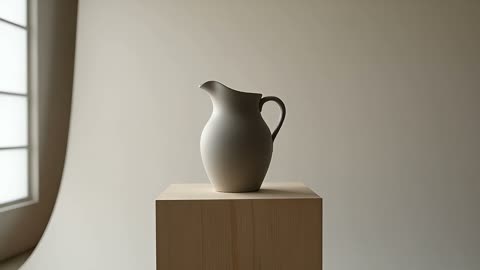 3.5s
3.5s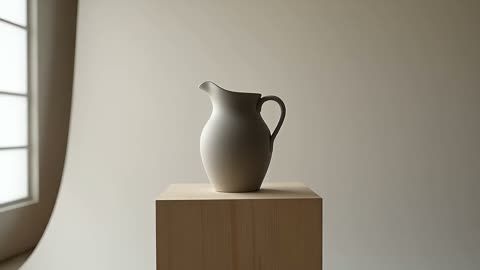 6.3sSTEP 3
Bulin 47 AI Set the shot conditions
Choose a Bulin 47 AI Wan 2.7 duration from 2 to 15 seconds and select 720p or 1080p. In text mode, choose the aspect ratio, then check the displayed credits.
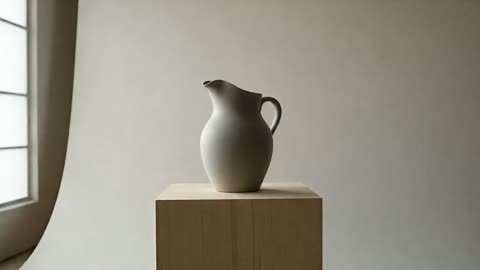
- Create one seven-second landscape shot of a matte ceramic pitcher standing on a pale wooden pedestal. The camera makes a slow sideways slide that reveals the curve of the handle. Keep the pitcher, pedestal, lighting, and background fixed. Soft window light from the left. End with a brief steady hold. No people, labels, new objects, or scene cuts.DownloadSTEP 4
Bulin 47 AI Review the entire result
Play the Bulin 47 AI Wan 2.7 clip from beginning to end, checking the subject, transition, and final composition. Refine the most important problem before creating another version.
Features
Give Bulin 47 AI Wan 2.7 Exactly the Time the Action Needs
A short reveal and a gradual change of viewpoint ask different things of time. Set the Bulin 47 AI Wan 2.7 duration around the event, not around an arbitrary maximum.
Bulin 47 AI Make a brief insert immediately readable
A two-second insert leaves little room for explanation. Start with the important object already visible and ask for one change, such as a ribbon settling beside a package. With Bulin 47 AI Wan 2.7, describe the opening arrangement before the action. That gives the shot a clear purpose even when it will appear between longer scenes in an edit.
Bulin 47 AI Reserve space for the arrival
For a longer movement, divide the idea into a beginning, a change, and a settled finish. A camera could approach a display, reveal its surface texture, and stop before the clip ends. Write that progression into the Bulin 47 AI Wan 2.7 brief without cramming in unrelated events. The final pause can make the result easier to assess and place beside other footage.
Connect Two Visual States with Bulin 47 AI Wan 2.7
Image generation becomes more directed when the destination matters as much as the opening. Bulin 47 AI Wan 2.7 accepts first and last frames for this kind of visual brief.
Bulin 47 AI Choose endpoints that belong to the same scene
A closed presentation box and the same box open on the same table form an understandable pair. Match their proportions, viewpoint, and surrounding objects before sending them to Bulin 47 AI Wan 2.7. Describe the physical change between the pictures. Conflicting labels, lighting directions, or product shapes leave ambiguity that a motion prompt alone may not resolve.
Bulin 47 AI Evaluate the journey as well as the endpoints
Two supplied pictures do not certify every intermediate frame. Watch for lids changing shape, surfaces sliding, and objects appearing without a cause. A Bulin 47 AI Wan 2.7 transition is useful when the movement makes visual sense throughout, not merely when the opening and ending resemble the intended states. Revise the action or use more compatible images when the middle becomes confusing.
Frame the Bulin 47 AI Wan 2.7 Scene for Its Destination
Composition starts before motion. The five text-mode canvases in Bulin 47 AI Wan 2.7 let you describe a scene around its intended viewing shape instead of relying on a later crop.
Bulin 47 AI Use width or height with a clear purpose
Text mode offers 16:9, 9:16, 1:1, 4:3, and 3:4. Choose a wide frame for lateral movement or a tall frame for a subject rising through the composition. Tell Bulin 47 AI Wan 2.7 where the subject begins and how much surrounding space remains visible. Avoid placing essential labels or features against an edge the movement will cross.
Bulin 47 AI Prepare image inputs as finished compositions
In image mode, start with a picture already framed around the intended action. A tight crop may leave no room for a handle to turn or a camera to reveal more of the scene. Prepare a usable starting image for Bulin 47 AI Wan 2.7 rather than expecting the motion instruction to recover missing visual information. Check the ending frame for the same limitations.
Direct Attention Through Bulin 47 AI Wan 2.7 Motion
The most useful movement reveals something. Give Bulin 47 AI Wan 2.7 a visible reason for the camera or subject to move, and keep other changes subordinate to that purpose.
Bulin 47 AI Separate camera motion from subject motion
Ask for a camera slide past a stationary object or for an object to turn within a stationary view. Mixing both can make the intended change harder to judge. In a Bulin 47 AI Wan 2.7 prompt, state which element moves and which stays anchored. Describe speed in relation to the reveal, such as a gradual approach that stops before the label fills the frame.
Bulin 47 AI Carry the same spatial relationships through the shot
Keep a stable reference in view: the table edge, a pedestal, or a fixed background feature. These details give the viewer a way to understand distance and direction. When reviewing Bulin 47 AI Wan 2.7, notice whether shadows, reflections, and contact points still agree with the main object. A restrained shot can communicate more than a complicated movement with uncertain geometry.
Choose and Review the Bulin 47 AI Wan 2.7 Output
Output size is one production choice, not a substitute for a coherent scene. Compare the complete Bulin 47 AI Wan 2.7 take before deciding which details need another revision.
Bulin 47 AI Select 720p or 1080p for the task
Use the available resolution setting deliberately and check the workspace credits before submission. A Bulin 47 AI Wan 2.7 shot intended for close inspection deserves attention to fine edges and small lettering at its delivered size. Do not treat a resolution label as proof that text, materials, or product proportions are correct. Judge those features in the actual result.
Bulin 47 AI Refine the smallest change that matters
Keep the successful parts of the brief and name one observable correction: slower camera travel, a steadier object, or a longer final hold. Record the inputs and settings used for the Bulin 47 AI Wan 2.7 candidate you are comparing. This gives the next attempt a concrete question to answer instead of replacing a promising composition with a completely different scene.
Example prompts
Bulin 47 AI Text: a measured ceramic reveal
Create one seven-second landscape shot of a matte ceramic pitcher standing on a pale wooden pedestal. The camera makes a slow sideways slide that reveals the curve of the handle. Keep the pitcher, pedestal, lighting, and background fixed. Soft window light from the left. End with a brief steady hold. No people, labels, new objects, or scene cuts.
Bulin 47 AI Image endpoints: open the presentation box
Use the supplied first image of the closed box and the supplied last image of the same box open as the scene endpoints. Over eight seconds, show the lid opening in one smooth movement toward the ending arrangement. Preserve the box proportions, table position, and lighting. Keep the camera steady. No extra products, hands, lettering, or abrupt cuts.
Bulin 47 AI Image: reveal a woven texture
Animate the supplied product photograph for five seconds. Keep the woven basket resting firmly on its surface. Move the camera gently closer to reveal the weave while retaining the whole handle in frame. Maintain the existing color, shape, light direction, and surroundings. Settle before the end without introducing another object or changing the design.
User reviews
H3Max video creator feedback.
H3Max creator reviews

I made a full character PV for my game with MiniMax H3 in one afternoon. The menu UI stayed readable in every frame and the character never went off-model. That used to cost me a contractor and three weeks.

We tested every AI video generator on the market for stylized work. H3 is the only one that held our anime style across cuts. We now use it for pitch reels and animatics on every project.

I uploaded four product photos and got a listing video with music and a voiceover the same day. My click-through rate on the new listings is up 38%. H3 even got the label text on my packaging right.

I ship five vertical videos a week for three brands. MiniMax H3 gets me from brief to draft in under an hour, with sound already synced. My old workflow needed a videographer and two review rounds.

The editing side is what sold me. A client wanted the background of an interview changed — I typed one sentence into MiniMax H3 and the lighting on the subject matched the new scene automatically.

I previsualized my entire short film in MiniMax H3 before we shot a single frame. Rack focus, match cuts, even the title cards — it understands director language, not just keywords.
Bulin 47 AI Pricing and Credit Plans
One-time payment · No subscription
Pay per MV
RECOMMENDED$9.90/ MV
- 10 seconds · 720p · Original soundtrack
- Buy now, create whenever you are ready
- No subscription · No automatic renewal
- Failed generations refund $9.90 per failed MV
1 × $9.90$9.90
Your purchase adds MV uses to your account. It does not start a generation or change your credit balance. Taxes and final total appear at checkout.
Already have credits? Each MV uses 600 credits. Subscriptions and credit packs are still available in the tabs above.
Pay safely and securely with























FAQ
Frequently asked questions
What can I create with Bulin 47 AI Wan 2.7 on H3 Max?
Use Bulin 47 AI Wan 2.7 for text-led scenes or image-led motion, including product reveals and transitions between compatible first and last frames. Treat each result as a candidate to inspect, not automatic proof of product accuracy.
Which resolutions are available for Bulin 47 AI Wan 2.7?
Bulin 47 AI Wan 2.7 offers 720p and 1080p in this workspace. Select the output size before generating and review its displayed credits. Neither setting removes the need to check fine details or visual continuity.
How long can a Bulin 47 AI Wan 2.7 clip be?
Choose a duration from 2 to 15 seconds for Bulin 47 AI Wan 2.7. A brief insert can show one immediate change; a longer take gives a reveal more room to develop and settle.
Can Bulin 47 AI Wan 2.7 use both first and last images?
Yes. The Bulin 47 AI Wan 2.7 image workflow supports an opening frame and an optional ending frame. Use compatible pictures and describe the transition between them, then inspect the motion connecting those visual states.
Which aspect ratios does Bulin 47 AI Wan 2.7 text mode offer?
The Bulin 47 AI Wan 2.7 text workspace offers 16:9, 9:16, 1:1, 4:3, and 3:4. Choose the shape before writing detailed framing instructions so the movement has enough space within the composition.
Will Bulin 47 AI Wan 2.7 preserve every product detail exactly?
Exact preservation is not guaranteed. Inspect Bulin 47 AI Wan 2.7 output for altered lettering, geometry, reflections, and contact points. A convincing visual effect should not be used to represent a feature the real product does not have.
Where do I check the cost of Bulin 47 AI Wan 2.7 generation?
Review the credits shown in the Bulin 47 AI Wan 2.7 workspace after choosing your settings and before submitting. Recheck the amount when you change the configuration or start another generation rather than assuming a previous quote still applies.
CTA
Plan Your Next Reveal with Bulin 47 AI Wan 2.7
Bring a clear subject, a purposeful movement, and a compatible destination. Review your settings and credits, then create a Bulin 47 AI Wan 2.7 shot on H3 Max that you can judge from start to finish.
Open Video Workspace