 Bulin 47 AI
Bulin 47 AI H3 Max Styles for Five Distinct Animated Looks
Choose a visual language before you describe the scene. Bulin 47 AI H3 Max Styles on H3 Max brings together Hand Drawn, VHS, Retro Toon 70s, Low Poly, and 16-bit Pixel. Start from text or one image, then use Bulin 47 AI H3 Max Styles to develop a short 768P video with native audio and a clear creative direction.
Video workspace
Evening Tram Hand-Drawn Light Animation
13/45View prompt
Create a fifteen-second handheld phone video inside an almost empty vintage tram at dusk. A passenger traces the misted window. The mark becomes a warm apricot hand-drawn glow, curling around a finger and settling into the palm as a paper ticket. It folds into a swallow and flies along the handrail. Follow slightly late with imperfect handheld movement. Let the same glowing line transform continuously into a caterpillar, an arrow, a tiny sailboat, a miniature tram, a snail, an umbrella, and a small fish. Each form should retain recognizable marks from the previous one. The passenger reaches after it as it travels across seats, poles, and windows. Near the end, its trails spread through the carriage into a gentle sunset landscape drawn over the real surroundings, then return to a ticket in the passenger’s hand and scatter as paper fragments. Keep the animation flat and handmade, with chalk and crayon texture, uneven outlines, soft warm color, and subtle reflections. Preserve the real tram, natural motion blur, occasional missed focus, and the feeling of spontaneous discovery. Use wheel rumble, rattling handrails, footsteps, paper rustles, and faint playful drawing sounds. No music, captions, logos, sudden cuts, horror effects, or polished 3D characters.
Introduction
What Is Bulin 47 AI H3 Max Styles?
Bulin 47 AI H3 Max Styles groups five dedicated H3 Max video generators whose individual style endpoints are documented on fal.
Bulin 47 AI Style-specific generation rather than a generic filter
The official fal pages behind Bulin 47 AI H3 Max Styles describe separate generators for hand-drawn animation, VHS, retro painted animation, low-poly 3D, and pixel animation. Each creates 768P video with audio from a prompt and an optional first-frame image. Bulin 47 AI H3 Max Styles uses these distinct choices to establish the visual treatment before generation; it is not a filter for processing an uploaded video.
Bulin 47 AI One consistent starting workflow
In Bulin 47 AI H3 Max Styles, select one of the five looks, write a scene, and optionally upload one opening image. Choose a duration from five to fifteen seconds and use the seed control when needed. Output remains 768P. An image supplies the starting composition, while text-only generation begins from your description. Review the credits and judge the returned picture and soundtrack together.
How to use
How to Create with Bulin 47 AI H3 Max Styles
- PromptSTEP 1
Bulin 47 AI Select the style for your scene
Open Bulin 47 AI H3 Max Styles and choose Hand Drawn, VHS, Retro Toon 70s, Low Poly, or 16-bit Pixel. Begin with the treatment that fits the idea you want to explore.
- ModelH3 Max Styles768P16:98sPromptSTEP 2
Bulin 47 AI Describe the action and optional image
Give Bulin 47 AI H3 Max Styles a scene, movement, camera direction, and soundscape. Upload one compatible opening image when you want to start from an existing composition.
- First frameLast frame
 0.0s
0.0s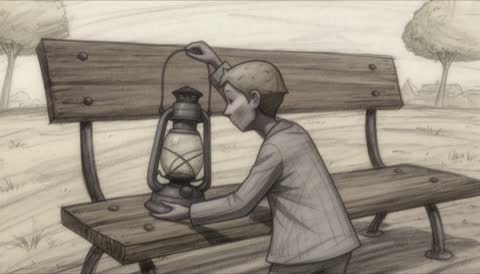 4.0s
4.0s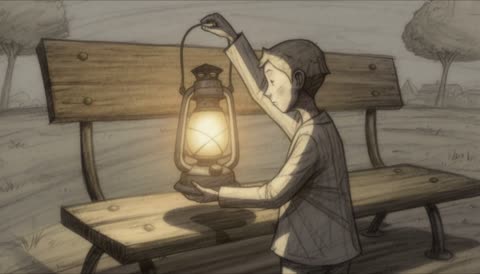 7.2sSTEP 3
Bulin 47 AI Review the generation settings
Choose five to fifteen seconds at the fixed 768P resolution. Set a seed when needed and check the credits for the configured request before submitting it.
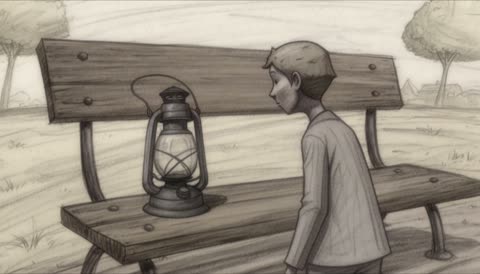
- Create one eight-second hand-drawn scene of a small paper explorer finding an unlit lantern on a bench. The explorer leans closer, lifts the lantern, and holds it as it begins to glow softly. Use clear pencil-like lines, a simple background, and a steady medium view. Quiet paper rustling and a gentle click, no speech or added lettering.DownloadSTEP 4
Bulin 47 AI Evaluate the complete styled clip
Watch Bulin 47 AI H3 Max Styles output with sound. Check visual continuity, the chosen treatment, and the ending; revise a specific part of the brief before creating another version.
Features
Explore Hand-Drawn Movement with Bulin 47 AI H3 Max Styles
The Hand Drawn option in Bulin 47 AI H3 Max Styles gives a scene an illustrated direction with room for expressive poses and readable lines.
Bulin 47 AI Write for the clarity of a drawing
Think about a gesture that would read in a small sequence of sketches: a character leaning toward a curious object or a long scarf lifting in a breeze. Give Bulin 47 AI H3 Max Styles one dominant action and a simple background. Bulin 47 AI H3 Max Styles can then be directed toward expressive movement without burying the scene under photorealistic material descriptions that conflict with the chosen look.
Bulin 47 AI Start with artwork that supports the treatment
A pencil or similarly drawn source can provide a compatible visual starting point for Bulin 47 AI H3 Max Styles. Use a clear silhouette and leave room for the intended motion. Describe which lines, shapes, and colors should stay recognizable, then review whether they do. The result is animated video, not editable strokes, separate drawing layers, or a promise that every line stays identical.
Create an Analog Mood with Bulin 47 AI H3 Max Styles
VHS in Bulin 47 AI H3 Max Styles applies an analog tape treatment to the generated scene rather than requiring you to construct that look manually.
Bulin 47 AI Choose a scene that benefits from the texture
A quiet rehearsal room, an empty arcade entrance, or a small tabletop still life can provide a setting for analog atmosphere. Tell Bulin 47 AI H3 Max Styles what should happen within that setting. Let the chosen VHS treatment establish the tape character. Bulin 47 AI H3 Max Styles still needs a subject and an action; asking only for nostalgia leaves the content of the scene undefined.
Bulin 47 AI Keep the subject readable through the treatment
Analog texture should not hide the essential action. When using Bulin 47 AI H3 Max Styles, choose strong shapes and avoid making tiny text the only important detail. For an image start, prepare the composition you want before uploading it. Review the returned video for readability and continuity, and do not present a newly generated retro-looking scene as genuine archival footage or a historical recording.
Build a Painted Scene with Bulin 47 AI H3 Max Styles
Retro Toon 70s gives Bulin 47 AI H3 Max Styles a hand-painted animation direction suited to deliberately composed settings and distinctive character silhouettes.
Bulin 47 AI Use a few expressive shapes and colors
A broad landscape, a plainly staged character, and a restrained palette can establish an illustrated world without overwhelming the frame. Ask Bulin 47 AI H3 Max Styles for a clear movement within that world, such as a traveler lifting a lantern. Keep the Bulin 47 AI H3 Max Styles brief aligned with painted animation rather than mixing demands for unrelated visual treatments or exact photographic surface detail.
Bulin 47 AI Make background and action work together
The environment can frame the performance without becoming equally busy. Direct Bulin 47 AI H3 Max Styles toward a still painted setting while one subject moves, or make a background element carry the main event. When supplying an image, painted-style artwork can support the intended look. Inspect whether the subject remains distinct from the scenery and whether the final pose gives the shot a useful conclusion.
Stage Geometric Action with Bulin 47 AI H3 Max Styles
Low Poly in Bulin 47 AI H3 Max Styles develops a retro 3D visual treatment in which strong forms and clear staging can carry the scene.
Bulin 47 AI Design the shot around readable geometry
Describe a few simple volumes, deliberate lighting, and a movement that makes their relationship apparent. Bulin 47 AI H3 Max Styles might be directed toward a small geometric vehicle following a curved road or a figure crossing a broad platform. Avoid dense decorative clutter. A Bulin 47 AI H3 Max Styles low-poly scene can be judged by its silhouettes and motion rather than by the amount of surface detail.
Bulin 47 AI Treat the result as video, not a 3D asset
Low-poly appearance does not turn Bulin 47 AI H3 Max Styles into a mesh exporter or a scene reconstruction tool. The output is a moving image. You can request a controlled viewpoint and coherent object placement, but unseen surfaces remain generated interpretations. Review overlaps, changing shapes, and the relationship between foreground and background before selecting footage for a game concept, animation study, or other visual presentation.
Compose Pixel Motion with Bulin 47 AI H3 Max Styles
The 16-bit Pixel option gives Bulin 47 AI H3 Max Styles a pixel-art direction while preserving the same text-or-image starting workflow.
Bulin 47 AI Make the action readable at a glance
Use a strong silhouette, a limited cast, and a clearly staged action for Bulin 47 AI H3 Max Styles pixel animation. A small robot reaching a signpost can be more legible than several characters crossing a crowded city. Bulin 47 AI H3 Max Styles does not supply a game engine or a sprite sheet. Plan a short video composition and evaluate whether the movement remains understandable across its duration.
Bulin 47 AI Join the visual rhythm to a restrained soundscape
Native audio lets a Bulin 47 AI H3 Max Styles brief include atmosphere and sound events alongside movement. For a pixel scene, describe a few sounds that belong to the action instead of demanding constant music and dialogue. Watch and listen to the entire Bulin 47 AI H3 Max Styles result. Check the image structure, audible timing, and ending, then save the settings and seed used for your chosen direction.

Example prompts
Bulin 47 AI Hand Drawn: a text-led lantern moment
Create one eight-second hand-drawn scene of a small paper explorer finding an unlit lantern on a bench. The explorer leans closer, lifts the lantern, and holds it as it begins to glow softly. Use clear pencil-like lines, a simple background, and a steady medium view. Quiet paper rustling and a gentle click, no speech or added lettering.
Bulin 47 AI VHS: animate an opening image
Use the uploaded image as the first frame of a seven-second VHS-style shot. Keep the main subject and setting recognizable while the camera makes a slight, steady approach. Preserve the overall lighting and keep other motion minimal. Subtle room ambience, no dialogue, new people, additional objects, titles, timestamps, or cuts to another scene.
Bulin 47 AI 16-bit Pixel: a small arrival from text
Create a ten-second pixel-art scene of a compact yellow robot walking along a simple stone path toward a blank wooden signpost. Use a clear side view, broad silhouettes, and a restrained sunset palette. The robot stops beside the post and looks upward. Light mechanical footfalls and a soft breeze, no speech, readable text, extra characters, or scene cuts.
User reviews
H3Max video creator feedback.
H3Max creator reviews

I made a full character PV for my game with MiniMax H3 in one afternoon. The menu UI stayed readable in every frame and the character never went off-model. That used to cost me a contractor and three weeks.

We tested every AI video generator on the market for stylized work. H3 is the only one that held our anime style across cuts. We now use it for pitch reels and animatics on every project.

I uploaded four product photos and got a listing video with music and a voiceover the same day. My click-through rate on the new listings is up 38%. H3 even got the label text on my packaging right.

I ship five vertical videos a week for three brands. MiniMax H3 gets me from brief to draft in under an hour, with sound already synced. My old workflow needed a videographer and two review rounds.

The editing side is what sold me. A client wanted the background of an interview changed — I typed one sentence into MiniMax H3 and the lighting on the subject matched the new scene automatically.

I previsualized my entire short film in MiniMax H3 before we shot a single frame. Rack focus, match cuts, even the title cards — it understands director language, not just keywords.
Bulin 47 AI Pricing and Credit Plans
One-time payment · No subscription
Pay per MV
RECOMMENDED$9.90/ MV
- 10 seconds · 720p · Original soundtrack
- Buy now, create whenever you are ready
- No subscription · No automatic renewal
- Failed generations refund $9.90 per failed MV
1 × $9.90$9.90
Your purchase adds MV uses to your account. It does not start a generation or change your credit balance. Taxes and final total appear at checkout.
Already have credits? Each MV uses 600 credits. Subscriptions and credit packs are still available in the tabs above.
Pay safely and securely with























FAQ
Frequently asked questions
Which looks are available in Bulin 47 AI H3 Max Styles?
The five choices are Hand Drawn, VHS, Retro Toon 70s, Low Poly, and 16-bit Pixel. Select the style in the workspace before submitting the scene; these are distinct generation options rather than a request to blend every look together.
Can Bulin 47 AI H3 Max Styles work from an image?
Yes. You may supply one opening image along with your prompt. Choose artwork or imagery compatible with the selected treatment. This workflow does not accept a video for restyling or a pair of endpoint images.
What duration and resolution does Bulin 47 AI H3 Max Styles use?
The workspace offers five to fifteen seconds of generated footage at a fixed 768P output. Select the clip duration in the controls. The number of seconds describes the video length, not the time needed to generate it.
Does Bulin 47 AI H3 Max Styles create audio?
Yes. These style generators produce video with native audio. Describe relevant atmosphere or sound events in the prompt and review the returned soundtrack. Exact dialogue, synchronization, and every requested sound are not guaranteed.
What does the seed do in Bulin 47 AI H3 Max Styles?
The seed is a randomness setting for generation. Record it with the style, prompt, image, and duration when comparing attempts. It is not an identity lock or a guarantee of identical results across different configurations.
Can Bulin 47 AI H3 Max Styles export animation layers or 3D models?
No such output is offered in this workflow. Hand-drawn, low-poly, and pixel describe video treatments, not editable project formats. Use the resulting clip as footage and keep your original artwork separately for future revisions.
How do I check the cost of Bulin 47 AI H3 Max Styles?
Read the credits displayed for the selected style and request settings before generating. Check them again before a revised attempt. No fixed completion time, free generation allowance, or universal price is promised on this page.
CTA
Choose a Visual Language with Bulin 47 AI H3 Max Styles
Start with the look that serves your idea, then give it an action and soundscape. Open Bulin 47 AI H3 Max Styles, review the duration and credits, and develop a short scene with a recognizable direction.
Explore the Five Styles